
Design for 3D Printing: 12 Rules Every 3D Designer Should Know
A model can look perfect on screen and still fail on the print bed. These 12 rules, with real numbers for FDM and resin, help you design parts that print right the first time.
Muhammad Faizan
· 11 min read
On this page
- Start with the process: FDM or resin?
- Rule 1: Know which printer the part is going to
- Make it strong: walls, overhangs and corners
- Rule 2: Give every wall real thickness
- Rule 3: Respect the 45° overhang rule
- Rule 4: Chamfer the bottom, fillet the inside corners
- Holes, fits and tolerances
- Rule 5: Holes are never the size you drew
- Rule 6: Design clearance into parts that fit together
- Orientation and fine detail
- Rule 7: Decide how the part will lie on the bed
- Rule 8: Small details have a floor
- Resin-specific: hollowing and drain holes
- Rule 9: Hollow large resin parts, and let them drain
- Big parts and assemblies
- Rule 10: Split large parts like a furniture maker
- Exporting a file that prints
- Rule 11: Export a clean, watertight mesh
- Rule 12: Print a small test before the full job
- When to hand the file over
A model can look perfect in the viewport and still fail on the print bed. The render doesn't care about gravity. The printer does. It also cares about nozzle width, cooling, how resin cures, and whether there is anything under the next layer for it to stand on. Design for 3D printing means thinking about those things while you model, not after the first failed print.
We run more than 15 FDM and resin printers in our studio in Moradabad, and many of the files that reach us come from other designers. The same few problems turn up again and again: walls one line thick, holes that come out too tight, lids that won't close, resin figures that crack after washing. None of them are hard to fix once you know the numbers.
Below are the 12 rules we work to ourselves, with starting values for both FDM and resin. Bookmark the card first. The rest of the article explains where each number comes from.
QUICK REFERENCE
Six numbers worth remembering
45°
Steepest FDM overhang without support, measured from vertical
0.8 mm
Thinnest FDM wall. Use 1.2 to 1.6 mm for parts that get handled
0.2 mm
Clearance on each side for a snug fit between FDM parts
0.6 mm
Thinnest resin wall, and only when it is supported at the sides
2 × 3 mm
At least two drain holes, 3 mm or wider, in every hollow resin part
0.5 mm
Chamfer on bottom edges to absorb the first-layer bulge
Start with the process: FDM or resin?
Rule 1: Know which printer the part is going to
FDM printers push melted plastic through a nozzle, usually 0.4 mm wide, and build the part line by line. They're tough, cheap per part and good for functional pieces: enclosures, brackets, jigs and large prototypes. Resin printers (MSLA) cure liquid resin with light, one thin layer at a time. They capture fine detail, crisp text and smooth surfaces, which is why figurines, jewellery masters and display models are almost always printed in resin.
The two have different limits. A wall that's fine in resin can be too thin for FDM, and a hollow that's fine in FDM traps liquid in resin. If you don't know yet where the part will be printed, design within FDM limits. Most parts that work on FDM will also work in resin, but the reverse often isn't true.
| FDM | Resin (MSLA) | |
|---|---|---|
| Layer height | 0.1 to 0.3 mm | 0.025 to 0.05 mm |
| Smallest detail | About 0.4 to 0.8 mm | About 0.1 to 0.2 mm |
| Surface | Visible layer lines | Smooth, almost no lines |
| Strength | Tough, but weaker between layers | Stiff, can be brittle |
| Best for | Functional parts, large prototypes, jigs | Fine detail, figurines, masters for moulds |
| After printing | Remove supports, light sanding | Wash, cure under UV, remove supports |
Make it strong: walls, overhangs and corners
Rule 2: Give every wall real thickness
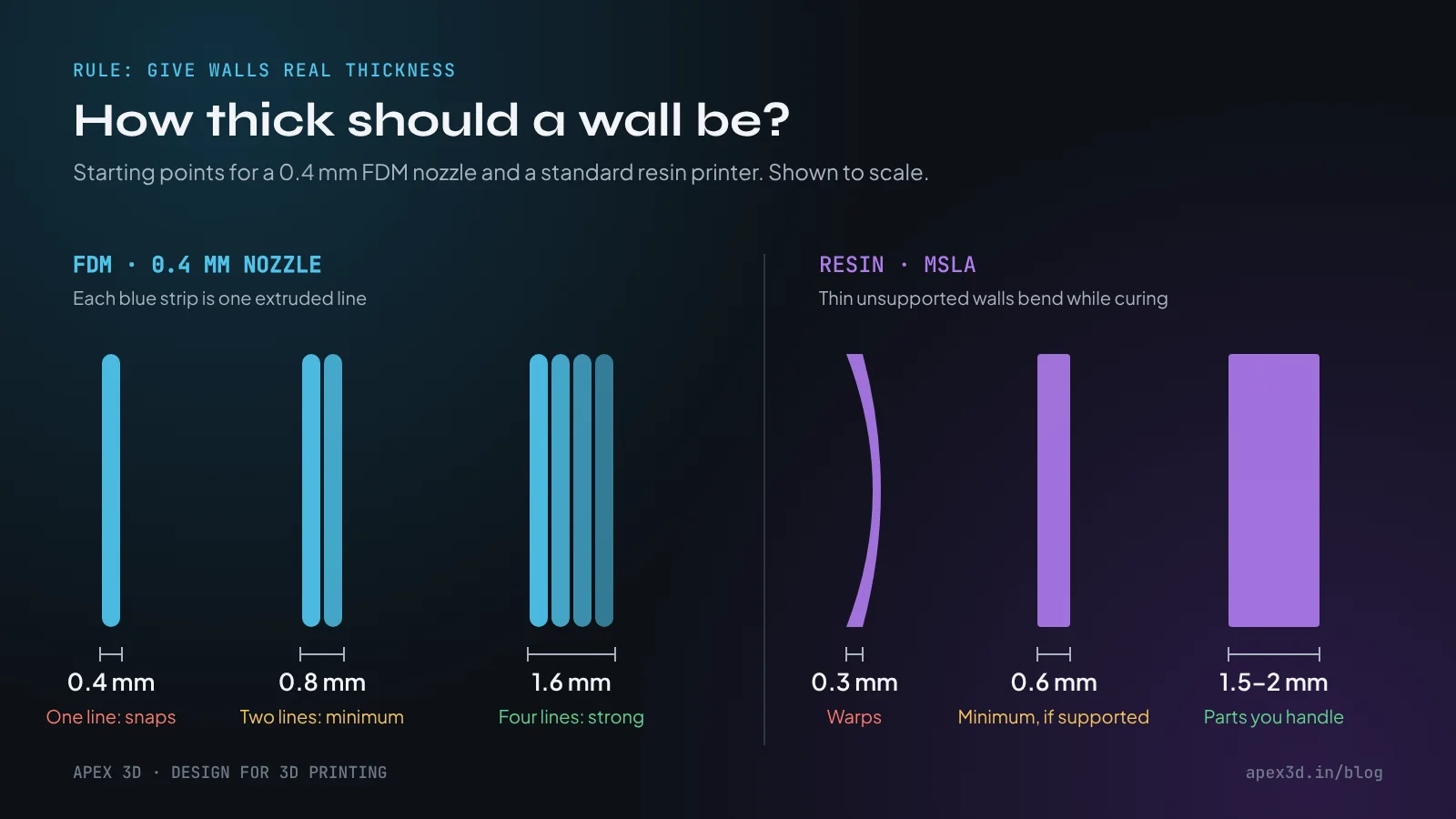
On FDM, wall thickness is counted in nozzle lines. With a 0.4 mm nozzle, a 0.4 mm wall is a single line of plastic. It will print, and then snap the first time someone holds it. 0.8 mm gives two lines and is the practical minimum. For anything that gets handled, screwed or clipped, design 1.2 to 1.6 mm. Keep the thickness a multiple of the line width too, so the slicer doesn't leave a thin gap down the middle of the wall.
Resin can go thinner, but thin unsupported walls bend while they cure and when each layer peels off the screen. 0.6 mm is a fair minimum for a wall supported at its sides. For parts people pick up, 1.5 to 2 mm is the safer choice.
Rule 3: Respect the 45° overhang rule
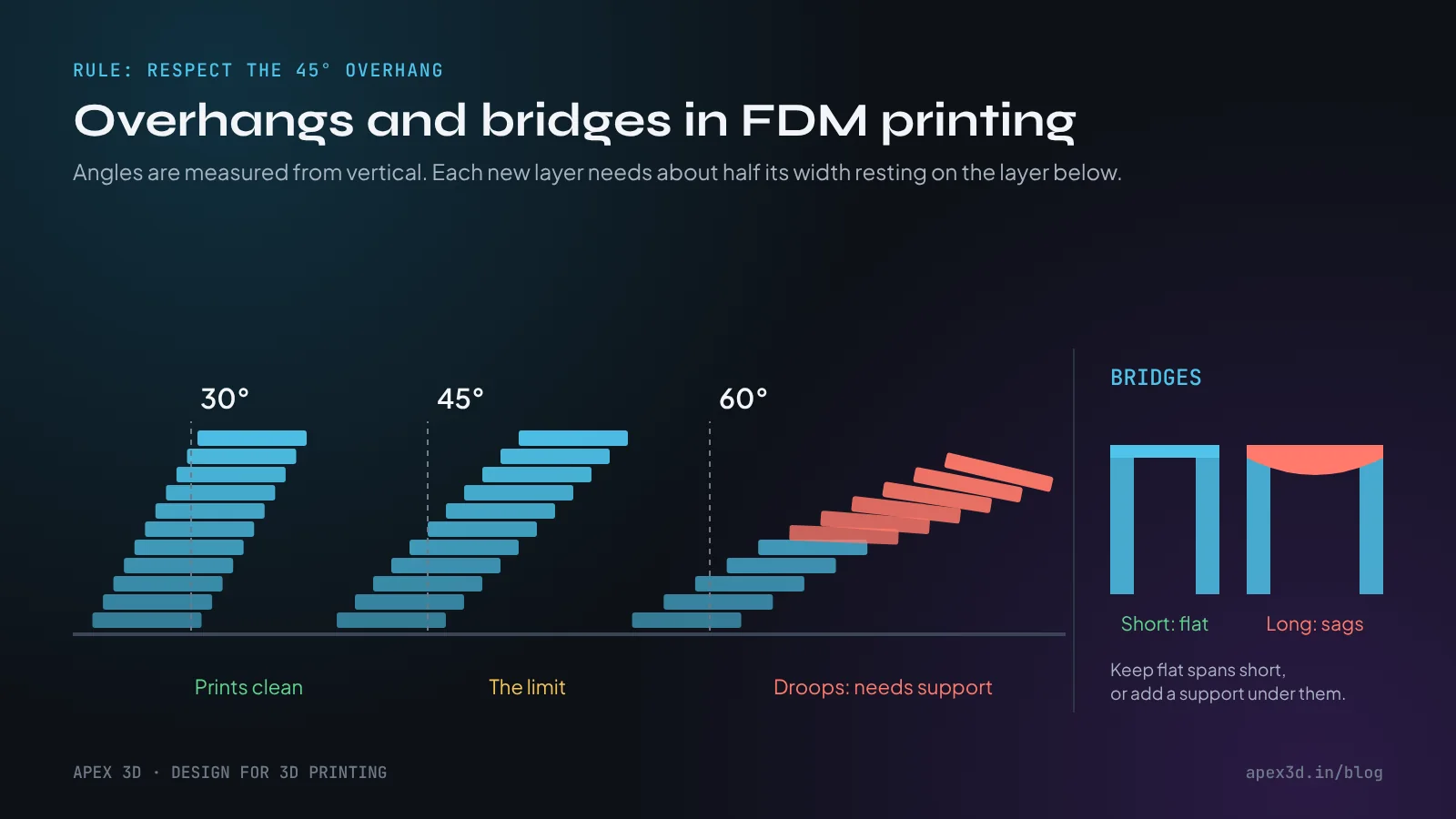
Every FDM layer needs something to sit on. Measured from vertical, a slope of up to about 45° keeps roughly half of each new line resting on the line below, and it prints clean without support. Go much further and the edge starts to droop, curl upwards, or turn into loose strands.
Bridges are the exception. A flat span between two walls can print in mid-air, because the plastic is anchored at both ends and cools as it's stretched across. Keep bridges short, up to about 10 mm for a clean underside. Longer ones sag in the middle.
When an overhang can't be avoided, try three things before adding supports. Put a 45° chamfer under a flat ledge instead of leaving it square. Split the part so the overhang becomes a face lying on the bed. Or turn the model so the steep face points upwards. Supports work, but they leave marks and add cleaning time.
Resin is less strict about angles, but every downward-facing area still needs support. So does every island, meaning any part of a layer that isn't connected to anything printed below it. Without support, islands print onto nothing and fail.
Rule 4: Chamfer the bottom, fillet the inside corners
The first layer of an FDM print is pressed onto the bed, so it spreads a little wider than the rest. This bulge is called elephant's foot, and it's the reason a box can come out 0.3 mm too wide at the base and refuse to slide into its slot. A 0.4 to 0.6 mm chamfer on the bottom edge absorbs it.
Inside corners have the opposite problem. A sharp 90° internal corner is where stress collects, and it's where brackets and clips usually crack. A fillet of 1 mm or more spreads that load. Outside corners can stay sharp, or take a small fillet if hands will touch them.
Holes, fits and tolerances
Rule 5: Holes are never the size you drew
Vertical holes on FDM come out smaller than modelled, often by 0.2 to 0.4 mm. The plastic pulls inward as it cools, and the slicer turns a perfect circle into short straight segments. If a 5 mm bolt has to pass through, model the hole at 5.3 to 5.4 mm. Or model it slightly small on purpose and drill it to size afterwards, which gives the most accurate holes of all.
Horizontal holes have a different problem: the top of the circle is an overhang. Small ones print fine, but above about 8 to 10 mm the top starts to sag. Use a teardrop shape (a circle with a 45° point at the top) or a flat-topped hole. Once the part is assembled, nobody will notice.
Rule 6: Design clearance into parts that fit together
When two printed parts have to fit together, the gap is part of the design. Model a 10 mm peg for a 10 mm hole and it won't go in. The values below are per side, so a 10 mm peg with a 0.2 mm snug clearance needs a 10.4 mm hole.
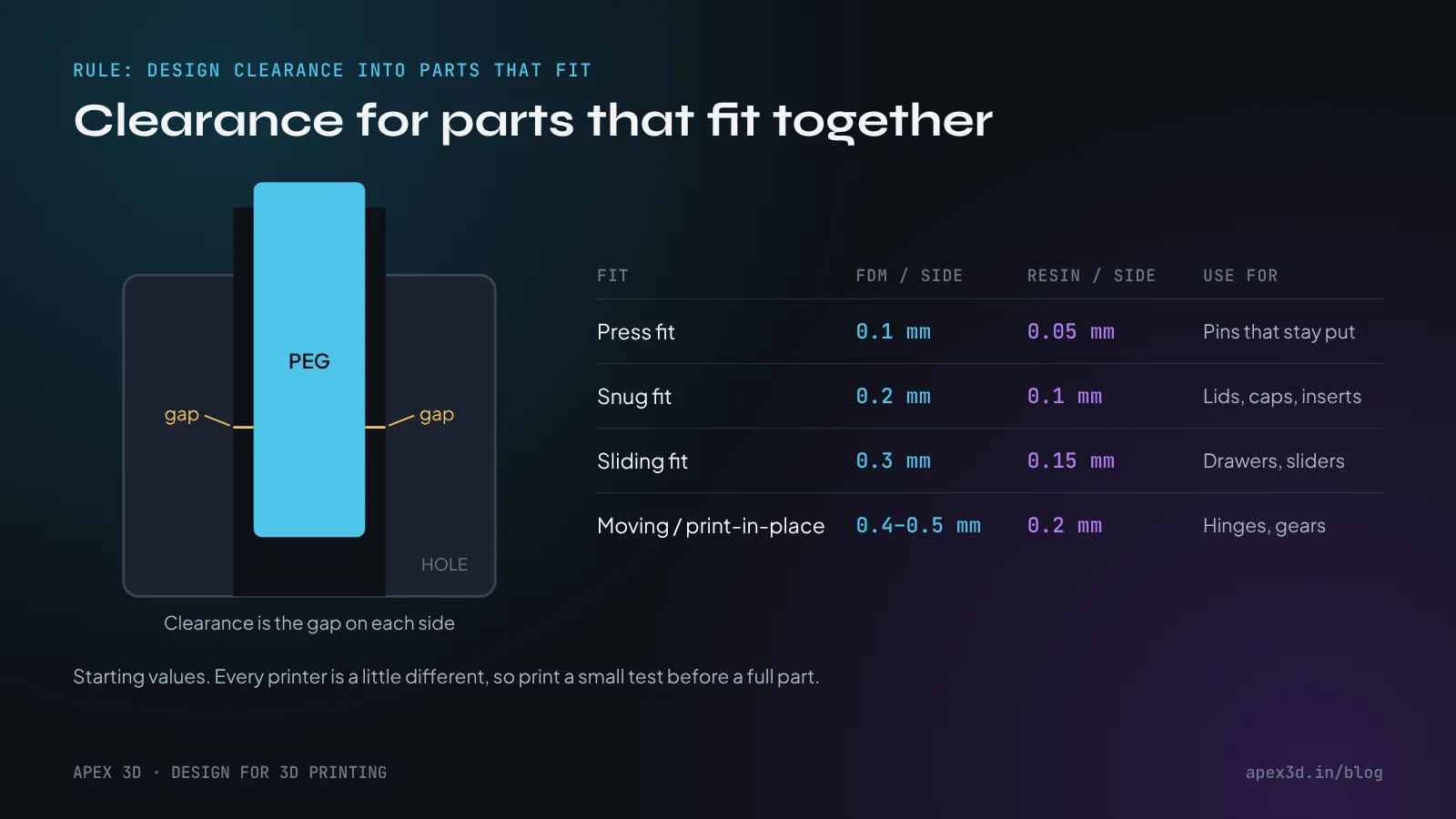
These are starting values, not laws. Printers, filaments and resins all behave a little differently. When the fit really matters, print a small test first. A short peg and a few holes in 0.1 mm steps take minutes to print and can save you a full reprint.
Orientation and fine detail
Rule 7: Decide how the part will lie on the bed
FDM parts are strong along their layers and weaker between them. The layers bond well enough for most uses, but pull across them and they can split apart like pages of a book. So think about the load before you think about looks. A hook printed standing up tends to snap at the bend. The same hook printed lying flat, with its layers running around the curve, holds.
Orientation also decides where support marks and layer lines end up. Put the face that matters, such as the front of a product or the side with the logo, flat on the bed or facing up, and plan for the underside to need light sanding.
Resin parts are usually printed tilted, often 30 to 45°, so each layer has a smaller area and peels off the screen more gently. Turn the visible faces away from the supports so the small support marks land on a surface nobody sees.
Rule 8: Small details have a floor
FDM can't print anything narrower than its line. Raised or engraved details should be at least 0.6 to 0.8 mm wide and about 0.5 mm high or deep. For text that people can actually read, use letters 5 mm tall or more in a bold, simple font. Thin serif text turns into blobs.
Resin is far more forgiving. Details of around 0.2 mm and text from about 2 mm tall come out sharp. That's why faces on figurines, jewellery and fine ornament nearly always go to a resin printer.
Resin-specific: hollowing and drain holes
Rule 9: Hollow large resin parts, and let them drain
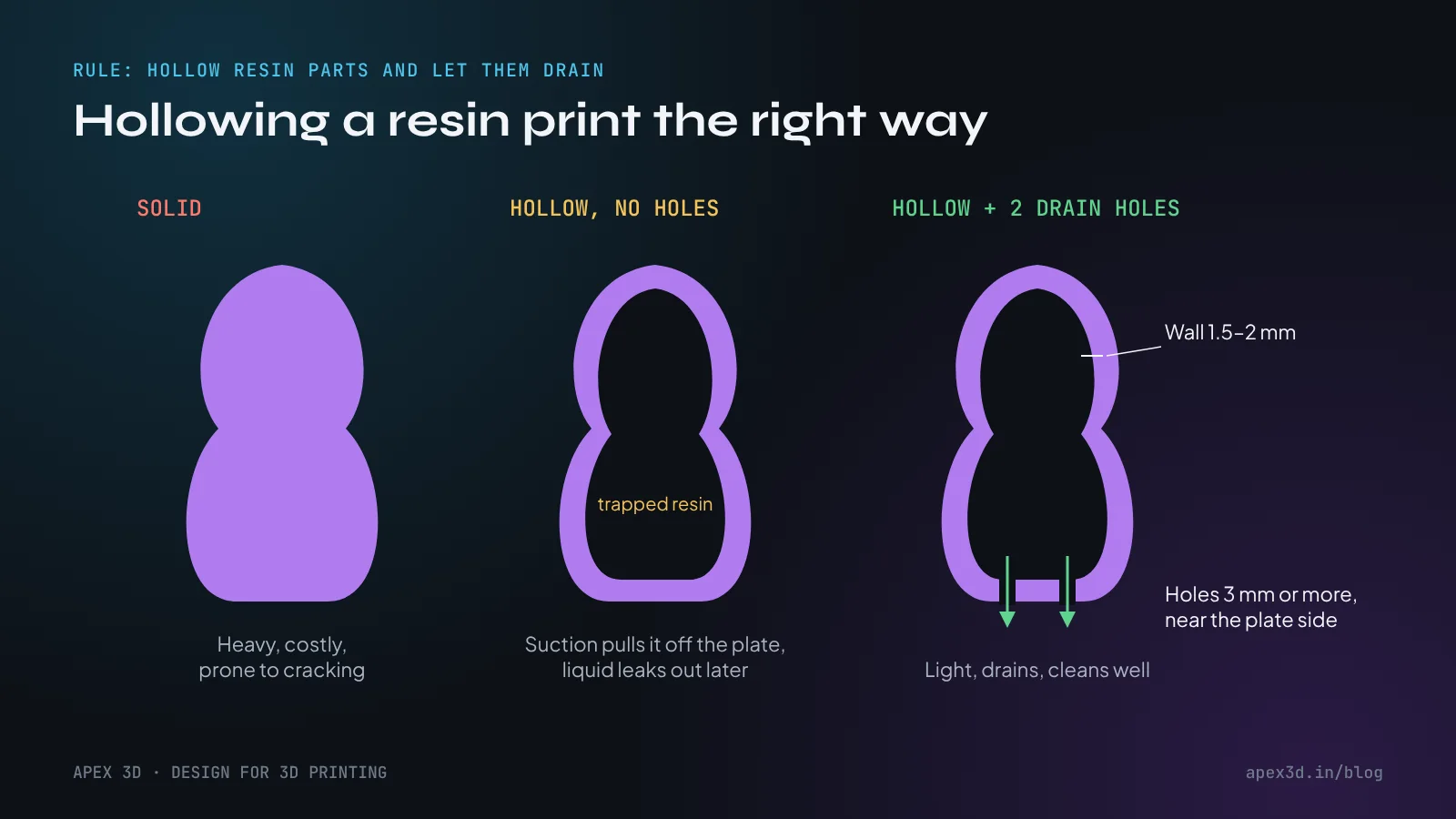
A solid resin figure uses a lot of resin, prints slowly and can crack later from stress inside it. Hollowing it with a 1.5 to 2 mm wall solves all three. But a hollow part with no openings is a sealed cup. Each time the printer lifts, that cup pulls against the vat like a suction cup, and it can tear the print off its supports. Any liquid resin left inside can leak out, or crack the part weeks after it's finished.
The answer is drain holes: at least two, each 3 mm or wider, placed near the side that faces the build plate. You need two because a single hole doesn't let air in to replace the liquid. Put them somewhere they can be plugged with a drop of resin and sanded smooth, or on the base where nobody looks.
Big parts and assemblies
Rule 10: Split large parts like a furniture maker
When a model is bigger than the print bed, or simply prints better in pieces, split it on purpose. Cut along natural lines: a seam, an edge, a change in shape. Then add alignment features so the pieces only go together one way, such as 3 to 5 mm pins with 0.2 mm clearance, keys, or a simple dovetail. Flat cut faces also glue much better than curved ones.
Splitting helps quality as well as size. A tall, thin part printed as two halves lying down is often stronger and cleaner than one long part standing up.
Exporting a file that prints
Rule 11: Export a clean, watertight mesh
A slicer needs a closed surface with a clear inside and outside. Open edges, flipped normals, duplicate faces and surfaces that pass through each other all confuse it, and the result is missing walls or random gaps in the print. Before you export:
Check the model is closed: a closed solid or polysurface in Rhino, a manifold mesh in Blender or ZBrush.
Join overlapping pieces into one body, or export them as separate files if they're meant to stay separate.
Work in millimetres. A model built in inches and opened as millimetres arrives 25.4 times too small.
Set the STL resolution with care: fine enough that curves look smooth (a deviation of around 0.01 mm), but not so fine that the file runs to hundreds of megabytes.
STL is still the most common format. 3MF is the better choice when your software supports it, because it keeps the units and can carry colours and several parts in one file. If the part may be machined or edited later, send a STEP file as well.
Free checks catch most problems before the printer does. The 3D Print Toolbox add-on in Blender highlights thin walls and open edges, and most slicers flag a broken mesh as soon as you load it.
Rule 12: Print a small test before the full job
A big print can run for ten or twenty hours. A test of the critical feature takes twenty minutes. Before committing, cut out the part that worries you, whether that's the snap fit, the thread, the thinnest wall or the smallest text, and print only that. If it works, the full part will too. If it doesn't, you've lost a few grams of material instead of a day.
BEFORE YOU EXPORT
The 10-point print check
- I know if this part is going to FDM or resin
- No wall is thinner than 0.8 mm (FDM) or 0.6 mm (resin)
- Overhangs are 45° or less, or I've planned supports
- Bottom edges have a small chamfer; inside corners have fillets
- Holes are oversized or ready to be drilled
- Parts that fit together have clearance on each side
- The part's orientation suits the load, and the best face is on top
- Text and fine details are above the printer's minimum size
- Hollow resin parts have at least two drain holes
- The mesh is closed, in millimetres, and exported as STL, 3MF or STEP
When to hand the file over
Most designers can handle all of this themselves once the numbers are second nature. But sometimes you're on a deadline, or the part has to fit something you can't measure, or you just want a second opinion before an expensive print. That's when it's worth sending the file to someone who prints every day. We check files before printing and tell you if something is likely to fail, and we can adjust the model or print a test piece for you first.
See what we print and with which materials on our 3D printing service page. If you're starting from a sketch or a photo rather than a finished file, 3D design and 3D modelling are the place to begin.
Not sure your model will print?
Send the STL, OBJ or 3MF on WhatsApp. We'll look at it and tell you what to change before anything goes on the printer.
Questions people ask
What is the minimum wall thickness for 3D printing?
On FDM, 0.8 mm is the practical minimum (two lines from a 0.4 mm nozzle), and 1.2 to 1.6 mm is better for parts that need strength. On resin, walls down to 0.6 mm print if they are supported, but parts that will be handled should be 1.5 to 2 mm.
How steep can an overhang be without supports?
On FDM, about 45 degrees from vertical prints cleanly on most machines. Beyond that the layers start to droop and you need supports, a chamfer or a different orientation. On resin, any downward-facing area needs supports, so orientation matters even more.
How much clearance should I leave between parts that fit together?
For FDM, start with 0.2 mm per side for a snug fit, 0.3 mm for a sliding fit and 0.4 to 0.5 mm for parts that must move freely. Resin is more accurate, so roughly half those values works. Always print a small test piece on the machine that will make the final part.
Which file format is best for 3D printing?
STL works on every slicer and is the safe default. 3MF is better when you can use it, because it keeps units, colours and several parts in one file. Send STEP as well if the part may need editing or machining later.
Why do holes come out smaller than designed?
Plastic shrinks slightly as it cools and curves are printed as many short straight segments, so holes lose a little size. Model them 0.2 to 0.4 mm larger, or print them undersize and drill them to the exact size.
Do hollow resin prints need drain holes?
Yes. A hollow resin part needs at least two holes of 3 mm or more, placed near the side that faces the build plate. Without them, liquid resin stays trapped inside, which causes suction during printing and can crack the part later.
- #3d printing
- #fdm
- #resin
- #tolerances
- #design for 3d printing